Webserver & Reverse Proxy Architecture
Overview
MoE Sovereign uses a two-tier reverse proxy model: an external Nginx running natively on the host handles public TLS termination and port routing, while an internal Caddy container provides TLS for the documentation domain only.
Tier 1 — Host-Level Nginx (External)
The host Nginx is not a Docker container. It runs directly on the OS of the VM/server that hosts the Docker stack, and it is responsible for:
- TLS termination via Let's Encrypt (certbot / acme) — certificates are managed at the OS level, not inside any container
- Reverse proxying of external HTTPS requests to the corresponding Docker service port
on
localhost - Public URL mapping — each configured public URL (e.g.
api.example.com) points to a specific host port viaproxy_pass
graph TD
    INTERNET["🌐 Internet"]

    subgraph HOST["Physical Host / VM (OS-Level)"]
        NGINX["Nginx\n(native, not Docker)\nTLS via Let's Encrypt\nPort 80 → 443 redirect"]
        CERTS["/etc/letsencrypt/\nLet's Encrypt certs"]
        NGINX --- CERTS
    end

    subgraph DOCKER["Docker Stack (same host)"]
        ORCH["langgraph-orchestrator\nlocalhost:8002"]
        ADMIN["moe-admin\nlocalhost:8088"]
        GRAF["moe-grafana\nlocalhost:3001"]
        PROM["moe-prometheus\nlocalhost:9090"]
        DOZZLE["moe-dozzle\nlocalhost:9999"]
        CADDY["moe-caddy :80/:443\n→ moe-docs :8098\n→ moe-dozzle :9999"]
    end

    INTERNET -->|HTTPS| NGINX
    NGINX -->|proxy_pass localhost:8002| ORCH
    NGINX -->|proxy_pass localhost:8088| ADMIN
    NGINX -->|proxy_pass localhost:3001| GRAF
    NGINX -->|proxy_pass localhost:9090| PROM
    NGINX -->|proxy_pass localhost:9999| DOZZLE
Typical Nginx Virtual Host Mapping
| External HTTPS URL | proxy_pass target |
Docker service |
|---|---|---|
api.example.com |
http://localhost:8002 |
langgraph-orchestrator |
admin.example.com |
http://localhost:8088 |
moe-admin |
grafana.example.com |
http://localhost:3001 |
moe-grafana |
metrics.example.com |
http://localhost:9090 |
moe-prometheus |
logs.example.com |
http://localhost:9999 |
moe-dozzle |
The exact URLs are configured in the Admin UI under Configuration → Public URLs.
The LOG_URL and PROMETHEUS_URL_PUBLIC fields store the external URLs for the
log viewer and Prometheus — these are informational links used in the Admin UI dashboard.
Let's Encrypt Configuration
TLS certificates are managed by certbot on the host:
# Obtain certificate (example)
sudo certbot --nginx -d api.example.com -d admin.example.com

# Auto-renewal via systemd timer or cron
sudo certbot renew --dry-run
Certificates reside in /etc/letsencrypt/live/<domain>/ and are referenced from the
Nginx virtual host configuration. Docker containers do not have access to these certificates.
Tier 2 — Internal Caddy Container
The moe-caddy container is a Docker-internal reverse proxy that exclusively manages
the MkDocs documentation domain. It handles its own TLS via the Caddy automatic HTTPS
mechanism (separate from host-level Let's Encrypt).
graph LR
    NGINX_HOST["Nginx\n(host, optional for docs domain)"]
    CADDY["moe-caddy\nPort 80 + 443"]
    DOCS["moe-docs\nMkDocs :8098"]
    DOZZLE2["moe-dozzle\n:9999"]

    NGINX_HOST -->|proxy_pass| CADDY
    CADDY -->|reverse_proxy| DOCS
    CADDY -->|reverse_proxy| DOZZLE2
The moe-caddy service depends on moe-docs and moe-dozzle. Its Caddyfile configures
both upstreams within the same Docker network.
Docker Network Architecture
All containers share the default (bridge) network created by Docker Compose. An additional
authentik_network is joined by moe-admin for server-side OIDC token exchange with Authentik.
graph TD
    subgraph dockerNet["Docker bridge network: moe-sovereign_default"]
        ORCH2["langgraph-orchestrator"]
        ADMIN2["moe-admin"]
        MCP2["mcp-precision"]
        CACHE2["terra_cache (Valkey)"]
        PG2["terra_checkpoints (Postgres)"]
        CHROMA2["chromadb-vector"]
        NEO2["neo4j-knowledge"]
        KAFKA2["moe-kafka"]
        PROM2["moe-prometheus"]
        GRAF2["moe-grafana"]
        NODE2["node-exporter"]
        CADV2["cadvisor"]
        PROXY2["docker-socket-proxy"]
        DOCS2["moe-docs"]
        DOZZLE3["moe-dozzle"]
        CADDY2["moe-caddy"]
        SYNC2["moe-docs-sync"]
    end

    subgraph authentik_net["External network: authentik_network"]
        AUTK["Authentik\n(external service)"]
        ADMIN2 -.->|OIDC token exchange| AUTK
    end
Port Reference — All Services
| Service | Host Port | Container Port | Protocol | Accessible Externally |
|---|---|---|---|---|
langgraph-orchestrator |
8002 | 8000 | HTTP | Via Nginx (optional) |
mcp-precision |
8003 | 8003 | HTTP | No (internal only) |
neo4j-knowledge |
7474, 7687 | 7474, 7687 | HTTP / Bolt | No (internal only) |
terra_cache |
6379 | 6379 | TCP | No (internal only) |
terra_checkpoints |
— | 5432 | TCP | No (internal only) |
chromadb-vector |
8001 | 8000 | HTTP | No (internal only) |
moe-kafka |
9092 | 9092 | TCP | No (internal only) |
moe-admin |
8088 | 8088 | HTTP | Via Nginx (required) |
moe-prometheus |
9090 | 9090 | HTTP | Via Nginx (optional) |
moe-grafana |
3001 | 3000 | HTTP | Via Nginx (optional) |
node-exporter |
9100 | 9100 | HTTP | No (internal scrape) |
cadvisor |
9338 | 8080 | HTTP | No (internal scrape) |
docker-socket-proxy |
2375 | 2375 | HTTP | No (internal only) |
moe-docs |
8098 | 8000 | HTTP | Via moe-caddy / Nginx |
moe-dozzle |
9999 | 8080 | HTTP | Via moe-caddy / Nginx |
moe-caddy |
80, 443 | 80, 443 | HTTP/S | Via Nginx (optional) |
Dozzle — Log Viewer
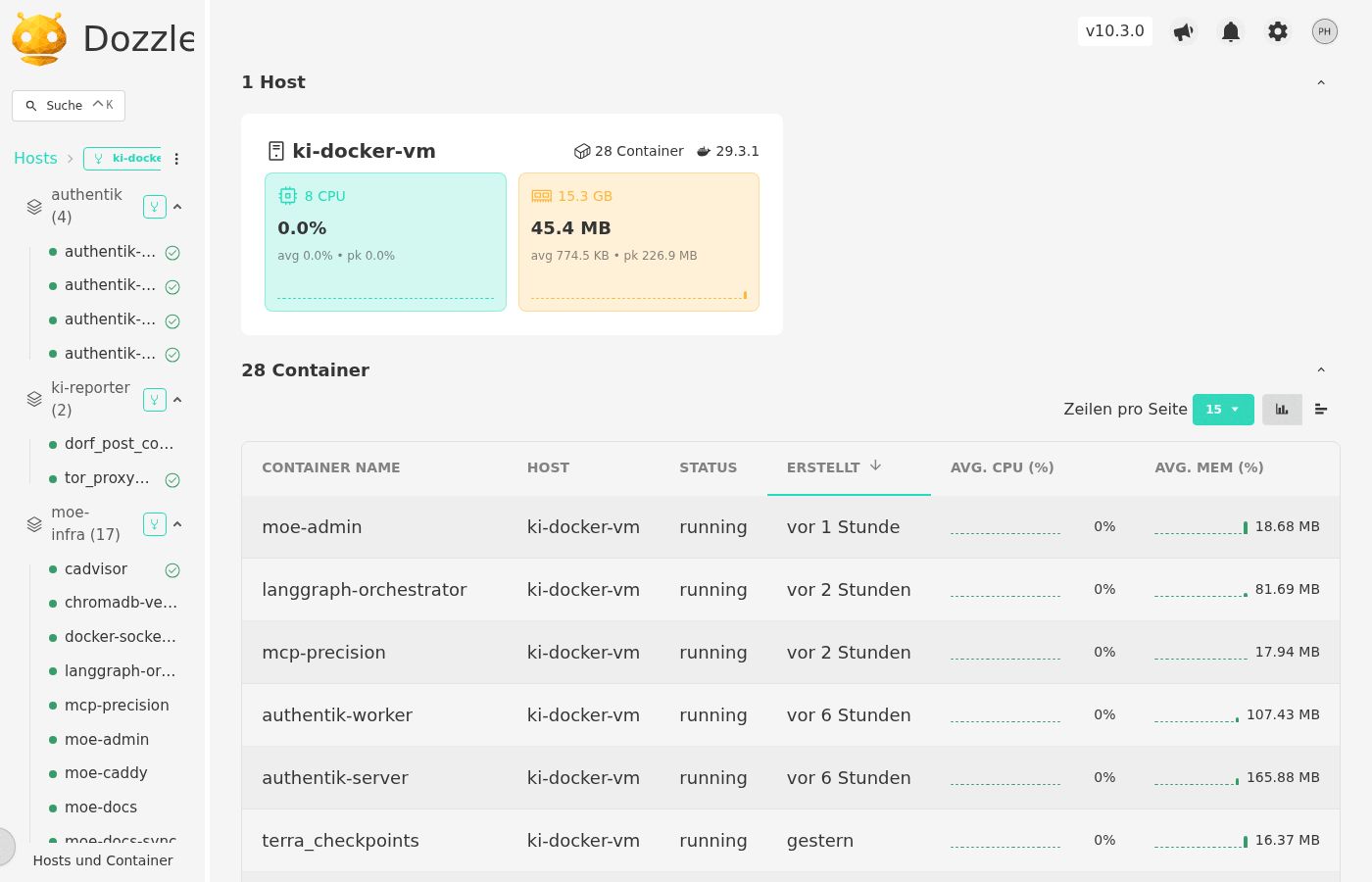
Dozzle provides a real-time log stream for all running Docker containers. Access is restricted via bcrypt-authenticated user accounts generated by moe-dozzle-init. The external URL is configured in the Admin UI as LOG_URL.
Security Considerations
- Docker socket access is never granted directly to
moe-admin. Instead, adocker-socket-proxy(tecnavia/docker-socket-proxy) is placed in front of the socket with read-only access configured viaCONTAINERS=1,SERVICES=1,TASKS=1,NETWORKS=1. - Prometheus and Grafana are accessible only via Nginx (with HTTP auth or SSO) — they should not be exposed on public interfaces without authentication.
terra_checkpoints(Postgres) has no host port binding — it is only reachable within the Docker network.- Authentik SSO integration uses server-side token exchange via the
authentik_networkDocker network — no client secrets are transmitted through the browser.
Admin UI — External URL Configuration
The Admin UI (Configuration → Public URLs) stores four categories of public URL:
| Field | Env var | Purpose |
|---|---|---|
| User Portal URL | APP_BASE_URL |
Base URL shown to end users |
| Admin Backend | PUBLIC_ADMIN_URL |
External admin URL (Authentik redirect URI sync) |
| Public API | PUBLIC_API_URL |
OpenAI-compatible API endpoint for clients |
| Log Viewer URL | LOG_URL |
External Dozzle URL (informational link in Admin UI) |
| Prometheus URL | PROMETHEUS_URL_PUBLIC |
External Prometheus URL (informational link) |
Changes to APP_BASE_URL, PUBLIC_ADMIN_URL, and PUBLIC_API_URL are automatically
synced to the Authentik OAuth2 provider's redirect_uris list after saving.