Claude Code Profiles
Claude Code Profiles control how Claude Code (Anthropic CLI / IDE extension) interacts with the MoE orchestrator. A profile defines model routing, pipeline mode, and response parameters.
Concept
Claude Code communicates via the Anthropic Messages API. A profile defines:
- Which tool model (LLM for tool calls) is used
- On which endpoint (inference server) it runs
- Which MoE mode is active
- Whether and how reasoning streaming is forwarded to Claude
Profile States: enabled / disabled
Profiles no longer have an exclusive "active" flag. Instead, each profile has an enabled state (enabled: true/false):
- Multiple profiles can be enabled simultaneously
- A user must have an explicit permission grant (
cc_profile) for a specific profile to access it - The profile must also be enabled — a disabled profile is not available to any user, even if they have a permission grant
- Toggling a profile's enabled state restarts the orchestrator so the change takes effect
Orchestrator Restart
Enabling or disabling a profile triggers an orchestrator restart. Requests in progress may be interrupted.
Profile Management (/profiles)
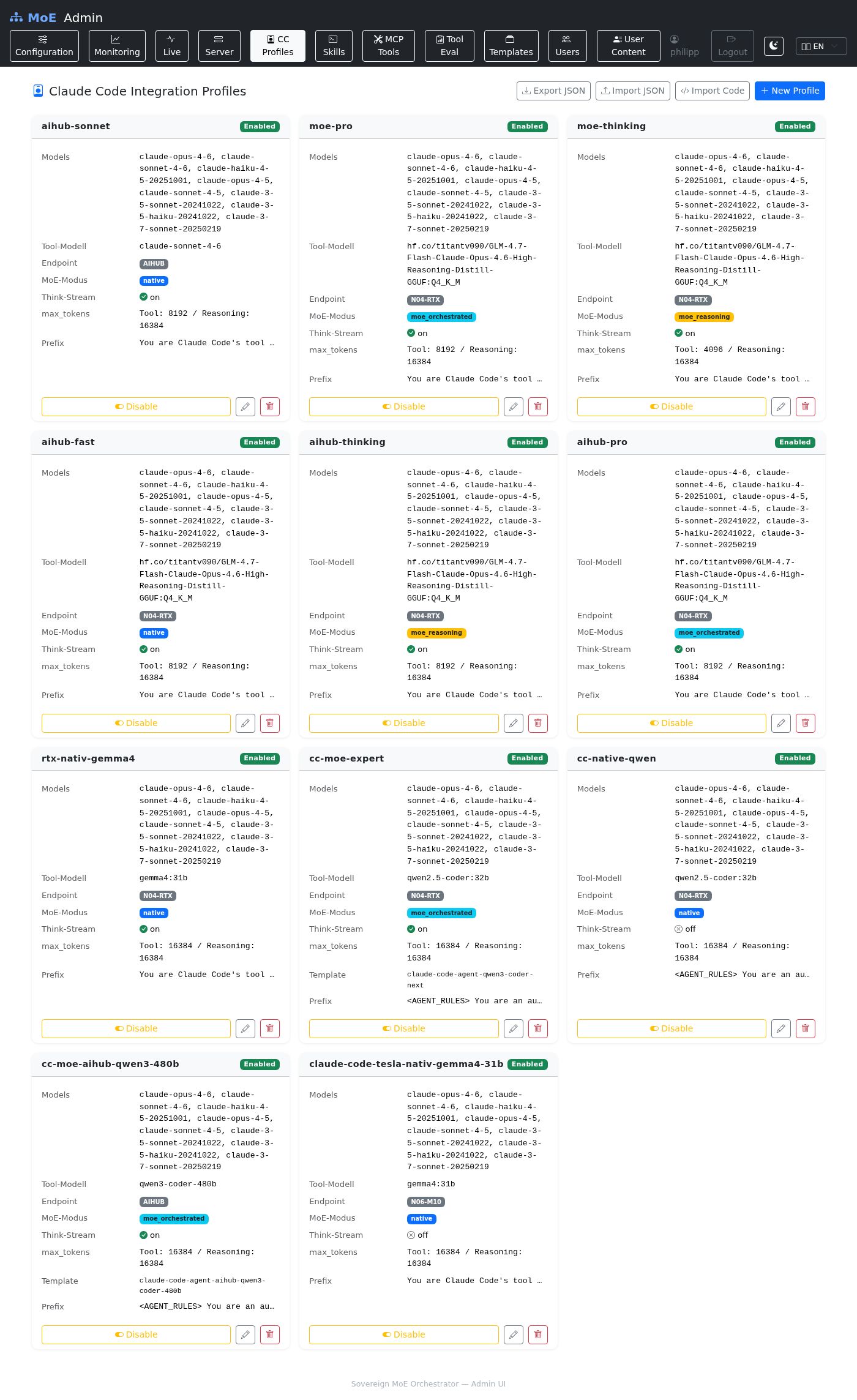
Profile Cards
Each profile is displayed as a card:
- Enabled / Disabled badge
- Actions: Edit, Enable/Disable toggle, Delete
- Multiple profiles can be enabled at the same time
Creating / Editing a Profile
| Field | Description | Example Value |
|---|---|---|
| Name | Unique profile name | Production – Claude Sonnet |
| Accepted Claude Model IDs | Comma-separated model IDs | claude-sonnet-4-6, claude-opus-4-6 |
| Tool Model | LLM for tool calls | qwen2.5:32b or devstral:24b |
| Tool Endpoint | Inference server (dropdown of configured servers) | (select from Admin UI → Servers) |
| MoE Mode | Pipeline mode | native / moe_reasoning / moe_orchestrated |
| Tool Choice | How tools are invoked | auto (default) or required |
| Tool max_tokens | Max tokens for tool responses | 8192 (min: 512) |
| Reasoning max_tokens | Max tokens for reasoning responses | 16384 (min: 512) |
| System Prompt Prefix | Prepended to all system prompts | You are a helpful assistant. |
| Think Stream | Send MoE pipeline progress to Claude | ☑ |
MoE Modes
| Mode | Description | Latency | Quality |
|---|---|---|---|
native |
Direct to GPU, no routing | Low | Standard |
moe_reasoning |
Reasoning expert pipeline | Medium | High |
moe_orchestrated |
Full MoE pipeline (Planner → Experts → Judge) | High | Maximum |
Enabling a Profile
Click the Enable toggle:
- Sets
enabled = truefor this profile - Restarts the orchestrator (with loading overlay)
- Users who have a permission grant for this profile can now use it
Disabling a Profile
Click the Disable toggle:
- Sets
enabled = falsefor this profile - Restarts the orchestrator
- The profile is no longer available to any user, even if they have a permission grant
Granting Profile Access to Users
CC profiles are assigned to users via permission grants:
Both conditions must be met for a user to use a profile:
1. The user has a cc_profile permission grant for the profile
2. The profile is enabled (enabled = true)
Import / Export
Export
Downloads cc_profiles.json. See Import & Export for the full schema.
Import
Two ways to import profiles:
Option A – Upload file:
Option B – Paste JSON code:
Import modes:
| Mode | Behavior |
|---|---|
merge |
Profiles with the same name are skipped |
replace |
Profiles with the same name are overwritten |
Cluster Impact
| Action | Effect |
|---|---|
| Create profile | Immediately available for permission grants |
| Edit profile | Active from the next Claude Code session |
| Enable profile | Orchestrator restart |
| Disable profile | Orchestrator restart |
| Delete profile | Grants for this profile are invalidated |
User-Owned Profiles
Users with the expert role and a model_endpoint permission can create their own CC profiles in the User Portal. These apply only to the respective user and override the admin profile while the user is logged in.
Admins can view and manage all user profiles under /user-content.