MCP Precision Tools — Deterministic Computations
What is the MCP Server?
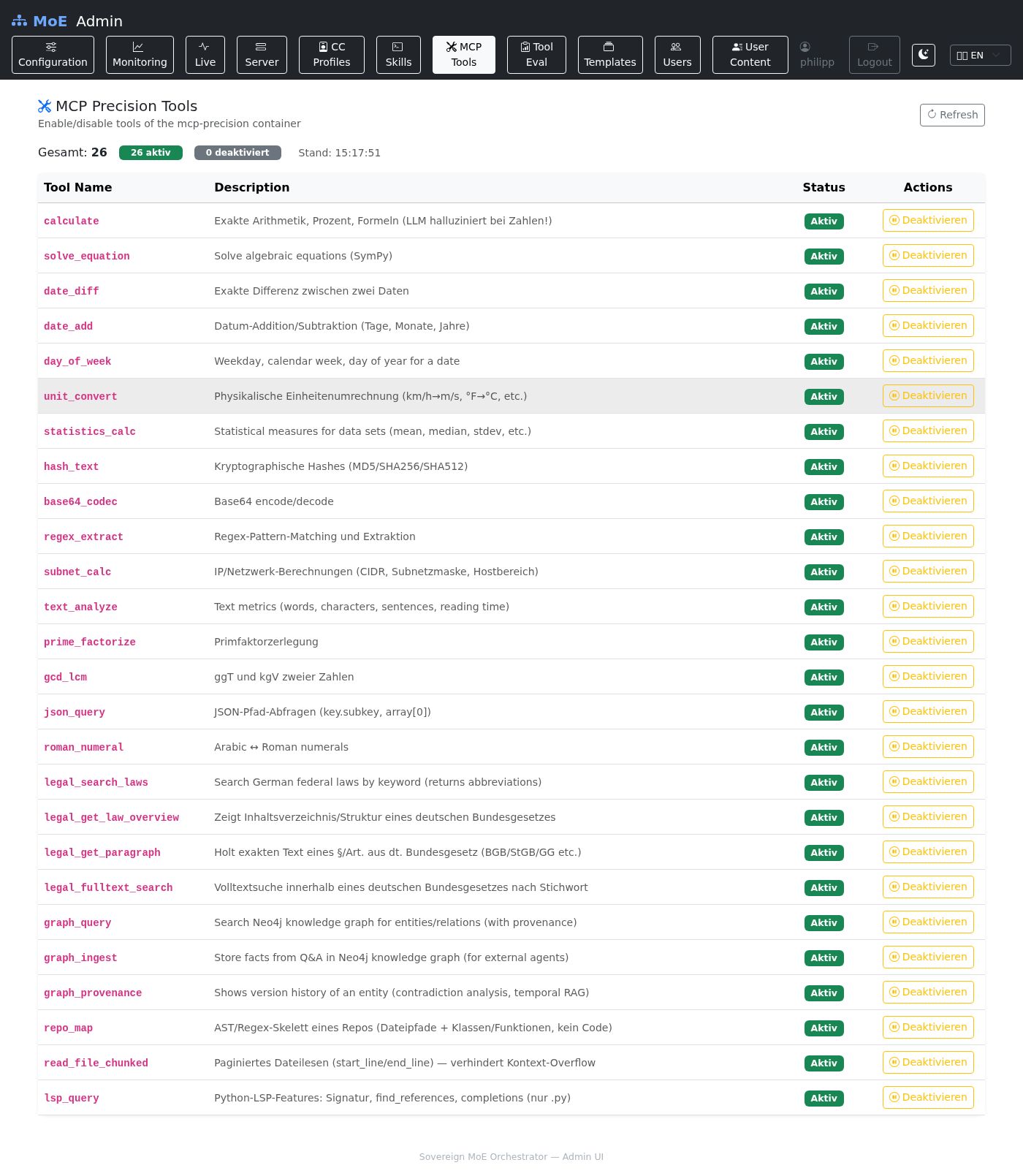
The MCP server (mcp_server/server.py) is a FastAPI service that exposes 16 deterministic computation tools behind a unified REST API. It implements the Model Context Protocol (MCP) and is also directly callable via /invoke.
Why Precision Tools instead of LLM computation?
LLMs hallucinate on computations. Even large models make errors in the 5–30% range with: - Multi-digit arithmetic - Equations with parameters - Date and time differences - Subnet masking (CIDR) - Unit conversions
...especially when the answer is embedded in natural language text.
The MCP server solves this through complete offloading from the LLM path. The mcp node in the LangGraph pipeline calls the service and returns the exact result. The LLM only formats text around the guaranteed correct result.
Pagination for code models — Large code responses (e.g. AST analyses, regex extracts over long text) are paginated so code models with limited context windows are not overwhelmed.
Available Tools
| Tool | Library | Description |
|---|---|---|
calculate |
Python ast (safe eval) |
Arithmetic without eval() — safe against injection |
solve_equation |
SymPy | Algebraic equations with symbolic variables |
date_diff |
python-dateutil | Difference between two dates |
date_add |
python-dateutil | Date + time delta |
day_of_week |
python-dateutil | Weekday for any date |
unit_convert |
pint | SI units, imperial measures, energy, pressure |
statistics_calc |
statistics (stdlib) | Mean, median, stdev, variance, mode |
hash_text |
hashlib | MD5, SHA-1, SHA-256, SHA-512 |
base64_codec |
base64 (stdlib) | Encode and decode |
regex_extract |
re (stdlib) | Regex match with group extraction |
subnet_calc |
ipaddress (stdlib) | CIDR, network address, broadcast, host range |
text_analyze |
— | Word/char/sentence count, readability score |
prime_factorize |
— | Prime factorization |
gcd_lcm |
math (stdlib) | Greatest common divisor, least common multiple |
json_query |
jmespath | JMESPath queries on JSON structures |
roman_numeral |
— | Arabic ↔ Roman |
API Reference
Base URL: http://localhost:8003
Invoke a tool
POST /invoke
Content-Type: application/json

{
  "tool": "calculate",
  "args": {"expression": "2 ** 32 - 1"}
}
Response:
Additional endpoints
GET /health      # {"status": "ok", "tools": [...16 tool names...]}
GET /tools       # Full tool descriptions with argument schema
GET /mcp/sse     # MCP SSE stream (for MCP-compatible clients)
Adding a new tool
Tools are fully self-contained in mcp_server/server.py. A minimal example:
async def roman_numeral(args: dict) -> dict:
    """
    Converts between Arabic and Roman numerals.
    Args: {"number": int} or {"roman": str}
    """
    try:
        if "number" in args:
            n = int(args["number"])
            # ... conversion logic ...
            return {"roman": result}
        elif "roman" in args:
            # ... reverse conversion ...
            return {"number": result}
        else:
            return {"error": "Provide either 'number' or 'roman'"}
    except Exception as e:
        return {"error": str(e)}
Afterwards:
1. Register the function in the TOOLS dict
2. Add a description in the /tools endpoint
3. Add an entry to this documentation page
For PR process details: CONTRIBUTING.md
File Generation Tool
The generate_file tool creates downloadable files from text content. It is
used by the orchestrator's output skill system to produce formatted deliverables.
Supported Formats
| Format | Extension | Library | Notes |
|---|---|---|---|
| HTML | .html |
Built-in | Content wrapped in a styled HTML template |
| DOCX | .docx |
python-docx | Headings (#, ##, ###) and paragraphs parsed from content |
| PPTX | .pptx |
python-pptx | ## headings become slide titles; body lines become bullet points |
| Markdown | .md |
Built-in | Raw content written as-is |
| Plain Text | .txt |
Built-in | Raw content written as-is |
API Usage
POST /invoke
Content-Type: application/json

{
  "tool": "generate_file",
  "args": {
    "content": "# Report\n\nFindings paragraph...",
    "filename": "security-audit",
    "format": "docx"
  }
}
Response:
{
  "result": "File generated: a1b2c3d4e5f6_security-audit.docx (12.3 KB)\nDownload: /downloads/a1b2c3d4e5f6_security-audit.docx"
}
Download Endpoint
Generated files are served via a static download endpoint:
| Property | Value |
|---|---|
| Storage directory | /app/generated/ |
| Filename format | {uuid12}_{sanitized_name}.{ext} |
| Auto-cleanup | Files are deleted after 24 hours |
| Content-Type | Inferred from extension (e.g., application/vnd.openxmlformats-officedocument.wordprocessingml.document for DOCX) |
Deployment
# docker-compose.yml (excerpt)
mcp_server:
  build: ./mcp_server
  ports:
    - "8003:8003"
  environment:
    - NEO4J_URI=bolt://neo4j:7687
Port: 8003
Dockerfile: mcp_server/Dockerfile
Dependencies: mcp_server/requirements.txt (SymPy, pint, python-dateutil, jedi)